



Thử thách
FTMO mới: 1-bước
Nhận ngay
Tất cả FAQ How can I add a new broker server on my MT4?

How can I add a new broker server on my MT4?

Sometimes, traders are not able to find their servers on their Metatrader 4 in their PC/Mac. That is because they are using the universal Metatrader application or they are using another broker’s MT4 platform. However, you can always add another broker’s server on the existing server list. To do that:


  1. On your MT4, click File.
  2. Select Open an Account.
  3. Click Add new broker…… and type in the name of your broker or broker server.
  4. Select Scan.
  5. Select your server on the list.
  6. Click Next.

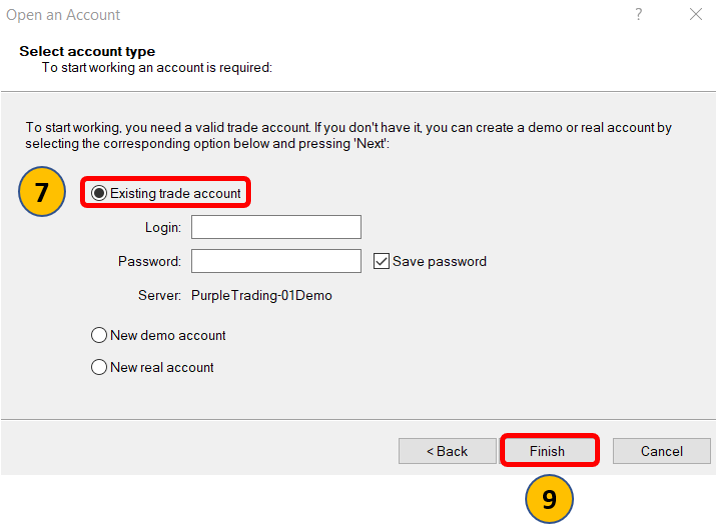
7. Select Existing trade account.

8. Enter your login credentials.

9. Click Finish

Bắt đầu Thử thách FTMO của bạn ngay
  • Dùng bao nhiêu bản dùng thử miễn phí tùy thích
  • Tài khoản FTMO với số vốn lên tới $200,000
  • Phần thưởng dựa trên hiệu suất

Worldwide Reviews

Chứng minh kỹ năng của bạn cùng một công ty uy tín
Chúng tôi đã đồng hành cùng các nhà giao dịch từ năm 2015. Hãy gia nhập cùng họ ngay hôm nay!
3.5Triệu+
Khách hàng trên toàn thế giới
$500Triệu+
Phần thưởng được chi trả trên toàn thế giới
4.8/5
Trustpilot